La Crosse Alerts Mobile
  • LA Mobile
    • Applied Use
    • Setup Video
    • Requirements
  • Resources
    • Register
    • Account
    • Gateways
    • Sensors
    • Weather Stations
    • Alerts
    • Reference
    • Warranty and Legal
  • Articles
  • Downloads
  • Contact Us

Gateway - 4 blinks fails

2/26/2015

0 Comments

 
4 Blinks – ready to register fails
The gateway should have the Red light blinking in sets of 4 within 30 seconds of powering up. If registration fails, factory reset. Check your Account page for an incomplete registration - a deleted gateway should not show under the Current Gateways list.
0 Comments

Gateway 1 Blink

2/26/2015

 
1 Blink – No Ethernet cable connection
  • Make sure the Ethernet cable is attached
  • Try another cable (cable is standard Cat5 LAN cable) 
  • Do you have a Router? (a switch looks similar but lacks DHCP)
  • Make sure the Router is turned on and Gateway cable is attached to an open port on the Router. 
  • Try another port on the Router. 
  • Try a complete reboot of router, modem & PC to be sure everything clears. 
  • Power cycle Gateway-unplug a/c for 10 seconds
  • Factory reset.

TX60/TX70/TX71 Sensor Troubleshoot

2/26/2015

 
To determine whether or not a sensor communicates effectively:
• Know the sensor interval
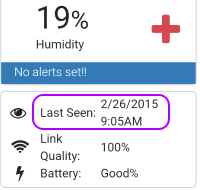
• Check the Gateway Last Seen in light of the interval (see illustration)
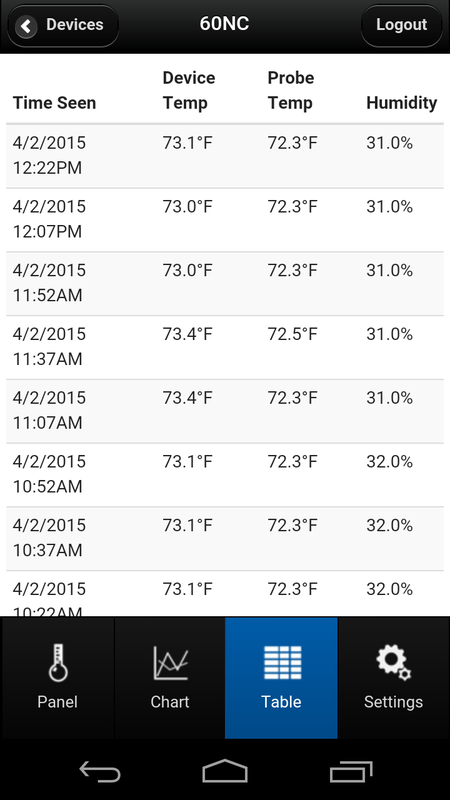
• Check Table readings are reasonable in light of the interval (see illustration).
• Check if you received a Not Connected email or text message
• Determine if the issue is no readings or sporadic readings.

If no more readings:
• Power cycle the components
• Wait at least 2X the interval and if still no updates
• Re-register only the sensor if the gateway red light is solid.  Re-register gateway and sensor if both are stale.

If sporadic readings:
• Power cycle the components
• Wait at least 2X the interval and if still sporadic
• Review placement of the sensor versus the gateway see sensor mounting.
Picture
Gateway Last Seen
Picture
Sensor Data

Remote Restart

2/26/2015

0 Comments

 
La Crosse Alerts Mobile provides an affordable solution for environment monitoring.  This system does not provide a remote restart option.  Generally, the gateway and sensors will self-recover from events like power or internet disruptions within a maximum of 2-3 hours.  It may be wise to make alternative arrangements for someone who can power cycle the system.
0 Comments

Weather Stations

2/26/2015

0 Comments

 
At this time, La Crosse Alerts Mobile does not support weather stations.  We are reviewing if the gateway-enabled weather stations (e.g. C84612, WS-2816) can be supported.  Check this page for updates.  In the meanwhile, all internet uploadable weather stations must run on lacrossealerts.com.

Note:  USB weather stations (e.g. C86234) will not migrate as the gateway model has more users.
0 Comments
<<Previous
Forward>>
© 2014-2015 La Crosse Technology Ltd.